In daily working, sometimes we need to combine excel files to one files. For example in telecommunication, we need to combine CDD, MO, or KGET files into one files.
This macro used to join those files into one files.
Hopefully it can help your works. Download here.
Wednesday, December 7, 2016
Thursday, October 8, 2015
Macro Transpose Relation
In telecommunication daily working, sometimes we need to transpose data from column based format to row based format, in example relation data from cell A to cell B. This macro can do that by one click. Just put input data on one sheet, result will appear on result sheet.
Click here to download
![]() | ||
| Main Menu |
![]() | |
| Input |
![]() | |
| Result |
Click here to download
NeTo - Neighbor Tool
Neto is an MBX application. Used to show, add, and remove neighbor on MapInfo. Using MCOM format for selecting cells.
Show Neighbors
Click here to download MBX
Click here to download Neto Manual
Show Neighbors
Click here to download MBX
Click here to download Neto Manual
Thursday, March 19, 2015
Macro Access Table Puller
Macro ini bisa digunakan untuk menarik data tabel di MS Access (mdb) file ke excel. Bisa digunakan untuk menggabungkan tabel yang sama di beberapa file access. Dalam praktek telco biasanya saya gunakan untuk mengambil tabel 'utrancell' atau tabel lain yang ada dalam beberapa KGET mdb.
Klik di sini untuk download
Sunday, May 25, 2014
Belajar Macro: Pindah Sheet
Tutorial kali ini akan mempelajari bagaimana memindahkan text/value dari satu sheet ke sheet lainnya dalam MS excel. Dalam contoh berikut akan memindahkan data laki-laki dan perempuan dari sheet 1 ke sheet 2 dan 3 terpisah antara laki-laki dan perempuan.
Berikut langkah-langkahnya.
1. Buka new sheet. Buat tabel seperti contoh berikut, lalu buatlah satu tombol dengan nama PINDAH.

2. Rename Sheet 2 dengan nama "Laki-Laki" dan Sheet 3 dengan nama "Perempuan". Isi baris pertama sheet-sheet tersebut seperti berikut.

3. Klik kanan pada tombol PINDAH lalu "assign macro".
Berikut langkah-langkahnya.
1. Buka new sheet. Buat tabel seperti contoh berikut, lalu buatlah satu tombol dengan nama PINDAH.

2. Rename Sheet 2 dengan nama "Laki-Laki" dan Sheet 3 dengan nama "Perempuan". Isi baris pertama sheet-sheet tersebut seperti berikut.

3. Klik kanan pada tombol PINDAH lalu "assign macro".
4. Ketikkan vba-code seperti di bawah ini:
5. Setelah selesai, coba klik tombol pindah. Maka sheet Laki-Laki akan terisi data sheet1 hanya yang berjenis kelamin laki-laki dan sheet Perempuan akan terisi data sheet1 yang berjenis kelamin perempuan.
Selamat mencoba!
Sunday, May 18, 2014
MBX Umfi Tool
MBX Umfi Tool digunakan untuk melihat neighbor umfi dari 2G ke 3G. Tool ini bukan berupa macro tetapi berupa mbx yang bisa di load dari Mapinfo.
Buka semua Tab File yang diperlukan di Mapinfo:
1. Tab File 3G (bisa MCOM/SNT/GCell), harus ada kolom PrimaryScramblingCode & UarfcnDl.
2. Tab File 2G (bisa MCOMSite), harus ada kolom Cell.
3. Tab File umfi, didapat dari parsing CDD compiled menggunakan Macro Parsing Umfi
Ketika pertama membuka tool, akan diminta untuk setup table:
Kemudian setup jarak maksimum untuk cek Umfi:
Klik pada 2G site untuk melihat umfi:

Download MBX Umfi Tool & Macro Parsing Umfi di sini.
Buka semua Tab File yang diperlukan di Mapinfo:
1. Tab File 3G (bisa MCOM/SNT/GCell), harus ada kolom PrimaryScramblingCode & UarfcnDl.
2. Tab File 2G (bisa MCOMSite), harus ada kolom Cell.
3. Tab File umfi, didapat dari parsing CDD compiled menggunakan Macro Parsing Umfi
Ketika pertama membuka tool, akan diminta untuk setup table:
Kemudian setup jarak maksimum untuk cek Umfi:
Klik pada 2G site untuk melihat umfi:

Download MBX Umfi Tool & Macro Parsing Umfi di sini.
Tuesday, July 16, 2013
Macro Hitung Jarak
Digunakan untuk menghitung jarak antara 2 lokasi berdasarkan longitude-latitude lokasi tersebut.
download di sini
download di sini
Tuesday, May 28, 2013
Wednesday, May 22, 2013
Macro Propagation Delay
used to check prach & propagation delay of site.
You can update data by importing log file or do it manually. download here
Monday, May 20, 2013
Belajar Macro (VBA) Excel: From Zero
Belajar macro atau VBA (Visual Basic for Application) sangatlah mudah, menarik dan sangat berguna. Apalagi jika pekerjaan Anda tidak jauh-jauh dengan processing data dengan Excel, Access. Rutinitas yang biasanya membosankan dan memakan waktu lama, bisa dilakukan hanya dengan satu klik saja.
Pada tulisan kali ini, akan dibahas belajar membuat macro dari nol, khusus untuk beginner.Platform yang digunakan di sini adalah Office 2010.
"Hello Word"
Di sini akan dibahas mengenai langkah pertama membuat macro excel sederhana 'hello word'.
1. Pertama buka Excel Anda. Perhatikan pada menu bar.
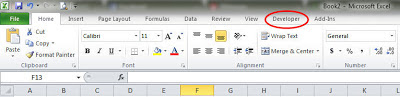
Jika ada menu Developer, silakan lanjut ke poin 2. Jika belum, ikuti step-step berikut.
2. Setelah itu, buat sebuah tombol di sheet1. Caranya pilih menu Developer-->Insert pilih gambar button. Lalu OK
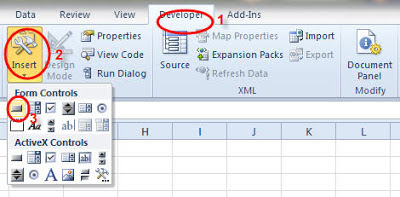

8. Maka akan muncul message box hello word.
9. Selamat Anda sudah melewati step pertama belajar macro.. :-)
Friday, May 17, 2013
Macro PAO/IPM
used to check PAO/IPM setting for Multi Carrier Power Amplifier (MCPA) in 2G Ericsson Network.
input: MO dump of BSCs
download here
Result:
input: MO dump of BSCs
download here
Result:
Thursday, May 16, 2013
Macro Co-SC
One of interference problem in 3G networks caused by Co-SC (Scrambling Code).
This macro used to find Co-SC cells in a custom range/distance.
Input: cells, long-lat, and its SC.
download here
This macro used to find Co-SC cells in a custom range/distance.
Input: cells, long-lat, and its SC.
download here
Wednesday, May 15, 2013
3G STS Swap Tool
Daily statistic tool to monitor network performance based on Cell, Cluster & Blended 3 Days Level.
Used in EID-XL Central Swap and Modernization Project 2013
Technology: VBA Access-Excel 2010
Dashboard:
Used in EID-XL Central Swap and Modernization Project 2013
Technology: VBA Access-Excel 2010
Dashboard:
Input (csv file)
Result (in Excel)
1. Cluster Daily
2. Cluster Blended
3. Cell Daily
Additional Features:
- Custom statistic date select
- Delete option
- Check minimum-maximum date of data
Subscribe to:
Posts (Atom)


